Morphological Catalog
The catalog module is the core of pyBIA’s morphological feature extraction and catalog-generation pipeline. It performs source detection, aperture photometry, and segmentation-based morphology measurements designed for training machine-learning models. This is all handled by the Catalog class.
This module combines image segmentation (via Astropy’s photutils) with moment-based descriptors (included in the image_moments module) to convert image data into a feature matrix containing:
Photometry: aperture fluxes and flux errors (and magnitudes if a zeropoint is provided).
Moments: raw, central, geometrically centered, Hu-invariant, and Legendre moments computed on the segmented source.
Segmentation properties: shape and intensity statistics (e.g., ellipticity, eccentricity, Gini, bounding box and other metadata).
Quick Start
Automatic detection (no input positions)
If you provide a 2D image containing various sources and do not specify positions, pyBIA will run segmentation on the full frame and build a catalog for all detected sources:
from pyBIA import catalog

# Instantiate the Catalog class (data is the image array)
cat = catalog.Catalog(data)

# Run source detection and compute photometric and morphological features
cat.create(save_file=True)

# The catalog is stored in the ``cat.cat`` attribute
print(cat.cat)
Targeted extraction (user-supplied positions)
If you want to analyze a specific source (or a set of sources) at known pixel positions, pass the x and y arguments, which represent the source coordinate(s), in relative pixels of the input image:
from pyBIA import catalog

# Example: 100x100 stamp with a source at the center
cat = catalog.Catalog(data, x=50, y=50)
cat.create(save_file=True)

print(cat.cat)
Computed Features
When morph_params=True (default), pyBIA returns a morphology vector containing various source properties including segmentation-based image moments.
Moments are computed on the segmented source pixels (all non-source pixels are zeroed prior to measurement). The moments table contains 47 features:
Raw moments up to 3rd order:
M00, M10, M01, M20, M11, M02, M30, M21, M12, M03
Central moments up to 3rd order:
mu00, mu10, mu01, mu20, mu11, mu02, mu30, mu21, mu12, mu03
Geometrically centered polynomial moments up to 3rd order:
G00, G10, G01, G20, G11, G02, G30, G21, G12, G03
Hu invariants:
Hu1, Hu2, Hu3, Hu4, Hu5, Hu6, Hu7
Legendre moments (orthonormal) up to total order 3 (n+m ≤ 3):
L00, L10, L01, L20, L11, L02, L30, L21, L12, L03
Shape/geometry:
eccentricity, ellipticity, elongation, orientation, perimeter, equivalent_radius, fwhm
Intensity/statistics:
gini, max_value, min_value, plus index metadata for extrema
Covariance/ellipse terms:
covar_sigx2, covar_sigy2, covar_sigxy, cxx, cxy, cyy, covariance_eigval1, covariance_eigval2
Bounds:
bbox_xmin, bbox_xmax, bbox_ymin, bbox_ymax
Scalar flag:
isscalar (stored as 1 for True, 0 for False)
In total, the default morphology vector contains 77 features per source (47 moment features + 30 segmentation properties), plus optional photometry and metadata columns (e.g., flux, flux_err, mag, mag_err, median_bkg, xpix, ypix, obj_name, field_name, flag), depending on which inputs are provided (e.g., zp, error, bkg, and position mode).
Methodology
Catalog generation follows one of two workflows depending on whether positions are provided:
Auto-detect mode (x/y not provided)
Background subtraction (optional): if
bkg=None, a robust global/tiled sigma-clipped background is subtracted from the full frame prior to segmentation.Segmentation: the background-subtracted image is convolved with a Gaussian kernel (FWHM = 9 pixels; window size set by
kernel_size), then thresholded atnsigusingphotutils.detect_sources(with an option todeblendthe detected sources).Photometry: circular-aperture photometry is measured at the detected centroids using radius
aperture(pixels).Morphology: for each detected centroid, a local square cutout of length
sizeis extracted and morphology features are computed on the segmented pixels.
Targeted mode (x/y provided)
When positions are input, pyBIA treats each coordinate pair as an independent source/measurement:
Photometry: circular-aperture flux is measured at
(x, y)using radiusaperture(pixels). Ifbkg=None, a sigma-clipped annulus median (radiiannulus_inandannulus_outin pixels) is used for local background subtraction and stored asmedian_bkg.Cutout extraction: a square cutout of length
sizeis cropped around the target coordinate (automatically reduced if the image is smaller thansize).Segmentation (cutout): the cutout is convolved with the Gaussian kernel and segmented using the same
nsig/kernel_size/npixels/connectivitysettings (with optionaldeblend). Ifexptimeis provided, the cutout is divided byexptimefor segmentation and morphology only (photometry is measured on the original data).Central validation: the detection is accepted only if a segmented region is present near the cutout center. If
threshold==0, the central pixel must lie in the segmentation; otherwise, at least one segmented pixel must fall within a central circular mask of radiusthreshold. The segmented object whose centroid is closest to the cutout center is retained.Morphology: moment features and segmentation properties are computed on the retained segmented pixels. If validation fails, morphology columns are set to -999 while photometry is still reported.
Key Parameters
The Catalog class includes the following parameters:
Parameter |
Default |
Description |
|---|---|---|
|
|
Source center pixel coordinates. If |
|
|
Background handling. Use |
|
|
Optional per-pixel error map (same shape as |
|
|
Zeropoint for magnitude calculation. If provided, |
|
|
Exposure time (seconds). If provided, cutouts are divided by |
|
|
If |
|
|
Segmentation detection threshold (in sigma above background). |
|
|
Central validation radius (pixels). Use |
|
|
If |
|
|
Side length (pixels) of the square cutout used to segment each source when computing morphology. |
|
|
Circular-aperture radius (pixels) for photometry. |
|
|
Inner radius (pixels) of the background annulus (targeted mode; |
|
|
Outer radius (pixels) of the background annulus. |
|
|
Gaussian convolution window size (pixels) used prior to segmentation. |
|
|
Minimum number of connected pixels required to define a detection. |
|
|
Pixel connectivity (4 = edge-connected, 8 = edge+corner-connected). |
|
|
If |
Note
Non-detections (morphology): if the segmentation does not contain a valid central object, pyBIA flags the source as a non-detection and sets all morphology columns to -999. Aperture photometry is still recorded.
Example
In this example, we generate a source catalog for a dataset of 20,000 simulated extragalactic sources (10k strong gravitational lenses, 10k non-lensed galaxies). These sources are simulated in the five bands LSST will observe (g, r, i, z, y).
Data Access You can download the sample binary files here:
Processing Script We will process each band individually, constructing separate catalogs for lenses and non-lenses, and then merging them.
  1import numpy as np
  2import pandas as pd
  3from pyBIA import catalog
  4
  5# Load the images, binary files (41x41 pixels) containing five filters: g,r,i,z,y
  6lenses = np.load('lenses_10k.npy')
  7nonlenses = np.load('nonlenses_10k.npy')
  8
  9# pyBIA catalog parameteres #
 10
 11error = None # The corresponding error map, for computing photometric errors
 12xpix = ypix = lenses.shape[-1] // 2 # Relative position (in pixels) of the source centroid, here they are centered about the image cutouts
 13bkg = None # None if background subtraction required, else set to 0 if data already bg-subtracted
 14aperture = 10 # Aperture radius (in pixels) for the photometry
 15annulus_in = 15 # Inner radius (in pixels) of background annulus for local sky estimation
 16annulus_out = 50 # Outer radius (in pixels) of background annulus.
 17nsig = 0.3 # The image segmentation detection threshold
 18threshold = 1 # Will plot the closest object within a circular mask of radius 1 (pixels) within the center
 19exptime = 1 # Exposure time to normalize the flux
 20zp = 27 # The instrumental zeropoint, for computing the apparent magnitudes
 21deblend = False # Whether to deblend detected source(s)
 22kernel_size = 21 # Gaussian filter kernel size used to convolve the data prior to segmentation
 23npixels = 9 # Required number of pixels above the sigma threshold required to detect a source
 24connectivity = 8 # Scheme to determine how pixels are grouped into a detected source, either 4 (touch along edges) or 8 (edges and corners)
 25
 26# Will process one band at a time, and save each individually
 27for i, band in enumerate(['g','r','i','z','y']):
 28
 29        # To save all of the individual catalogs
 30        master_catalog = []
 31
 32        # Loop through each individual lens source
 33        for j in range(len(lenses)):
 34                obj_name = j # The object name in the catalog will just be the order as it appears in the data
 35                flag = 1 # The positive class label
 36
 37                # Instantiate the Catalog class
 38                cat = catalog.Catalog(
 39                        data=lenses[j][i], # First axis selects the individual source, second axis the band
 40                        error=error,
 41                        x=xpix,
 42                        y=ypix,
 43                        bkg=bkg,
 44                        aperture=aperture,
 45                        annulus_in=annulus_in,
 46                        annulus_out=annulus_out,
 47                        nsig=nsig,
 48                        threshold=threshold,
 49                        exptime=exptime,
 50                        zp=zp,
 51                        deblend=deblend,
 52                        kernel_size=kernel_size,
 53                        npixels=npixels,
 54                        connectivity=connectivity,
 55                        obj_name=obj_name,
 56                        flag=flag
 57                        )
 58
 59                # Create the catalog, will be stored as the `cat` class attribute.
 60                cat.create(save_file=False)
 61
 62                # Append the created `cat` attribute to the master list
 63                master_catalog.append(cat.cat)
 64
 65        ##
 66        ## Now repeat for the non-lenses ##
 67        ##
 68
 69        # Loop through each individual non-lens source
 70        for j in range(len(nonlenses)):
 71                obj_name = len(lenses) + j # The object name in the catalog will just be the order as it appears in the data + how many lenses there are already
 72                flag = 0 # The negative class label
 73
 74                # Instantiate the Catalog class
 75                cat = catalog.Catalog(
 76                        data=nonlenses[j][i], # First axis selects the individual source, second axis the band
 77                        error=error,
 78                        x=xpix,
 79                        y=ypix,
 80                        bkg=bkg,
 81                        aperture=aperture,
 82                        annulus_in=annulus_in,
 83                        annulus_out=annulus_out,
 84                        nsig=nsig,
 85                        threshold=threshold,
 86                        exptime=exptime,
 87                        zp=zp,
 88                        deblend=deblend,
 89                        kernel_size=kernel_size,
 90                        npixels=npixels,
 91                        connectivity=connectivity,
 92                        obj_name=obj_name,
 93                        flag=flag
 94                        )
 95
 96                # Create the catalog, will be stored as the `cat` class attribute.
 97                cat.create(save_file=False)
 98
 99                # Append the created `cat` attribute to the master list
100                master_catalog.append(cat.cat)
101
102
103        # Now Merge all individual catalogs into one master dataframe and save
104        df = pd.concat(master_catalog, ignore_index=True)
105        df.to_csv(f'segm_catalog_{band}_band.csv', index=False)
The five catalogs generated above are available for download here:
These catalogs will be merged and used to train a binary classifier using the ensemble_model module. This example is provided in the Supervised Learning Algorithms page.
NOTE: The catalog module also provides a standalone function to plot individual sources and the corresponding image segmentation patches given some set of parameter(s). The plot_objects_segmentation function allows users to inspect the segmentation masks overlaid on the source. As the source morphological features are dependent on the resulting segmentation, it is important to ensure the generated patches are truly representative of the source morphology. This function allows users to input up to four segmentation detection thresholds (sigma_values), so as to visualize how different values affect the resulting source extent.
In the example below, we inspect a lens where only the i-band yields a positive detection at the strictest threshold (\(\sigma=5.0\)). The other four filters at this detection level would be non-detections and the corresponding morphological features would thus be cataloged with -999 values.
 1import numpy as np
 2from pyBIA import catalog
 3
 4# Load the lenses
 5lens = np.load('lenses_10k.npy')
 6
 7# Plotting parameters
 8median_bkg = None # Whether to subtract the background (set to None if background subtraction required)
 9pix_conversion = 5.8 # Survey pixel-per-arcsecond (for setting the axes)
10crop_size = None # Will crop the image to be of this size, otherwise set to None
11xpix = ypix = lens.shape[2] // 2 # Cropped image will be centered about these coords, if not cropping set to None
12r_in = 15 # Inner radius (in pixels) of background annulus for local sky estimation
13r_out = 50 # Outer radius (in pixels) of background annulus.
14
15# Figure parameters
16fig_title = r'Example Lens' # Figure suptitle
17sup_titles = [r'$g$', r'$r$', r'$i$', r'$z$', r'$y$'] # Title(s) above each individual panel
18cmap = 'viridis' # Colormap to use when displaying input image, the segmentation patches always use binary
19
20# Segm detection parameters
21sigma_vals = [0.3, 1.0, 3.0, 5.0] # The detection threshold(s) to apply
22deblend = False # Whether to deblend detected sources
23kernel_size = 21 # Gaussian filter kernel size used to convolve the data prior to segmentation
24npixels = 9 # Required number of pixels above the sigma threshold required to detect a source
25connectivity = 8 # Scheme to determine how pixels are grouped into a detected source, either 4 (touch along edges) or 8 (edges and corners)
26threshold = 0 # Will plot the object present within the image center
27savefig = True # Whether to save the figure, it False it will show instead
28savepath = 'segm_example_lens.png' # Path (and/or filename) to save in/as
29
30i = 4 # Will plot the fifth source in the array
31
32# This function takes in up to 5 images, and plots the detection thresholds (up to 4 thresholds allowed)
33catalog.plot_objects_segmentation(
34   lens[i][0],
35   lens[i][1],
36   lens[i][2],
37   lens[i][3],
38   lens[i][4],
39   pix_conversion=pix_conversion,
40   sigma_values=sigma_vals,
41   deblend=deblend,
42   kernel_size=kernel_size,
43   npixels=npixels,
44   connectivity=connectivity,
45   threshold=threshold,
46   titles=sup_titles,
47   suptitle=fig_title,
48   cmap=cmap,
49   xpix=xpix,
50   ypix=ypix,
51   size=crop_size,
52   median_bkg=median_bkg,
53   savefig=savefig,
54   r_in=15,
55   r_out=50,
56   savepath=savepath
57   )
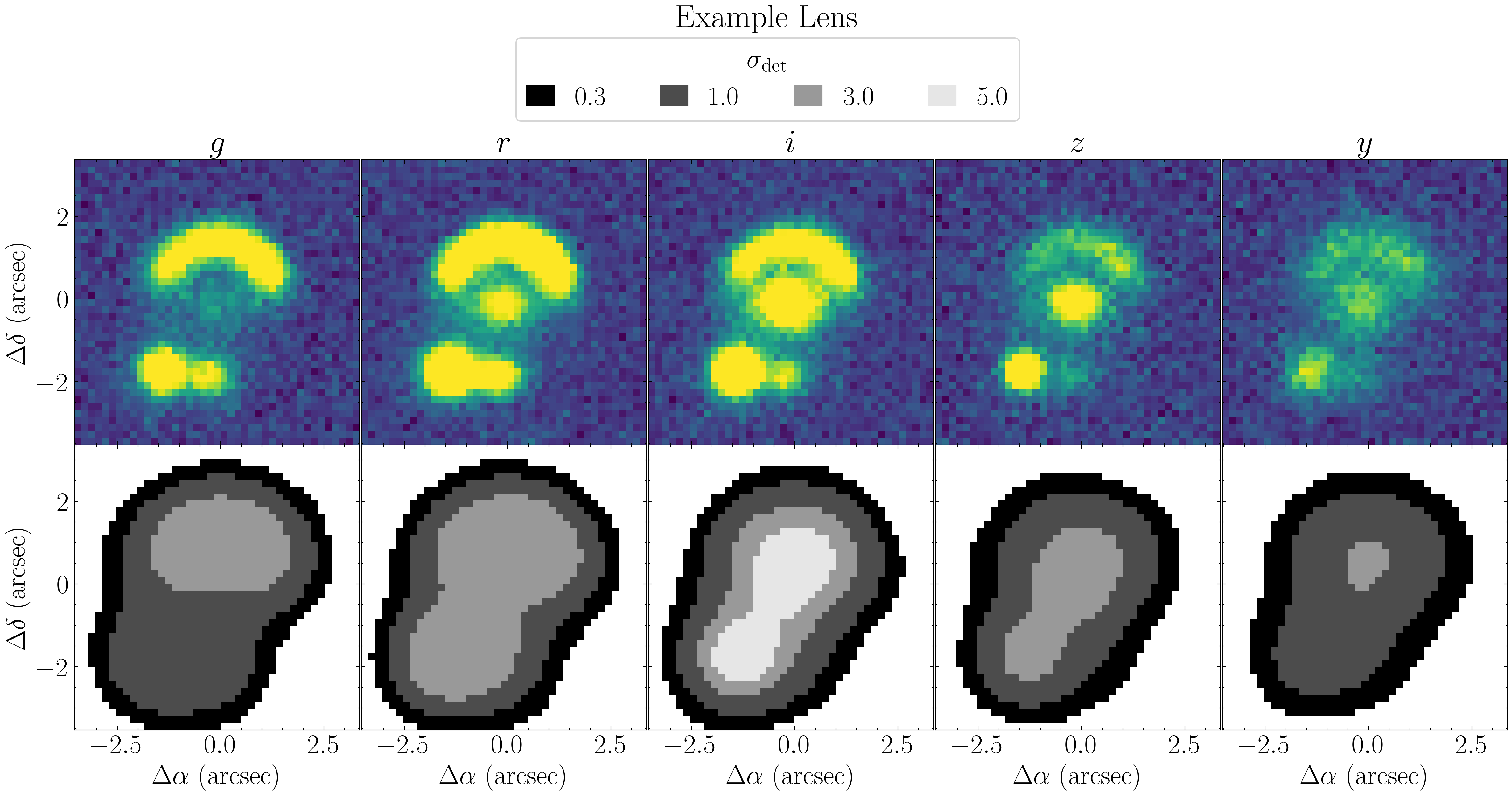
Visualization of segmentation maps across 5 bands. The binary masks illustrate the detected morphology at increasing sigma thresholds, computed from the sigma_values.